
If you are a Onsego30 student, you are eligible to download free GED Ready vouchers.
The Onsego30 plan includes 4 GED Ready® vouchers. You can download these vouchers from the “Home page” after logging in to your account.
You will be using the Onsego webpage because Onsego30, the super-fast-track course, is part of Onsego GED Prep.
-
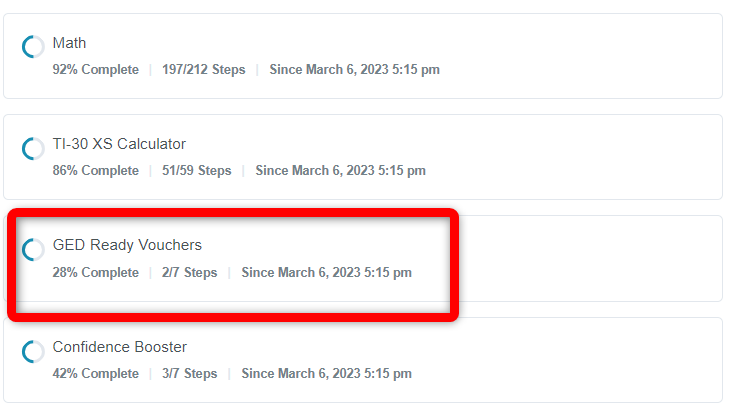
Your Onsego dashboard - To do so, click on “GED Ready Vouchers” and choose the “Get Voucher #1” tab.
- Here you can click on the link “Click here to order your voucher.”
-
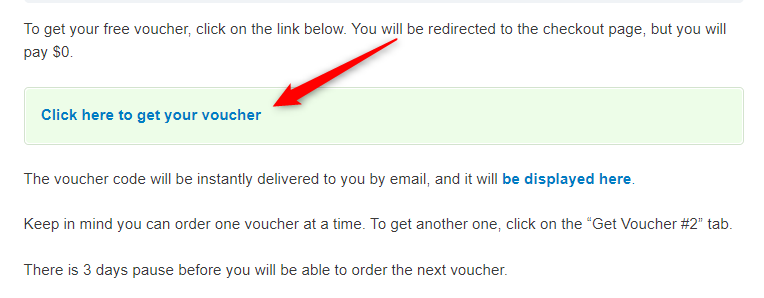
This page explains how to get your free voucher - You will be redirected to the checkout page, where you can “buy” a free voucher.
- To complete an order, check “I accept terms and conditions” and click on the “Place Order” button.
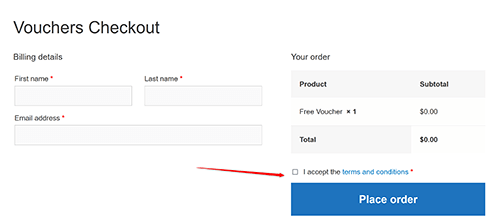
This is a checkout page, but you pay $0 - Your code will be displayed on the order summary page, and you will also receive an email with this code.
Keep in mind that you can order 1 voucher code at a time. You can order the next one 3 days later by clicking on the “Order Voucher #2”, etc. To check your previously ordered voucher codes, click on “My Previous Orders.”