
You can activate the calculator by simply clicking the blue button under the title, as shown in the image below. Once you do that, the calculator will pop up, and you’ll be able to use the handler to easily move it around your screen.
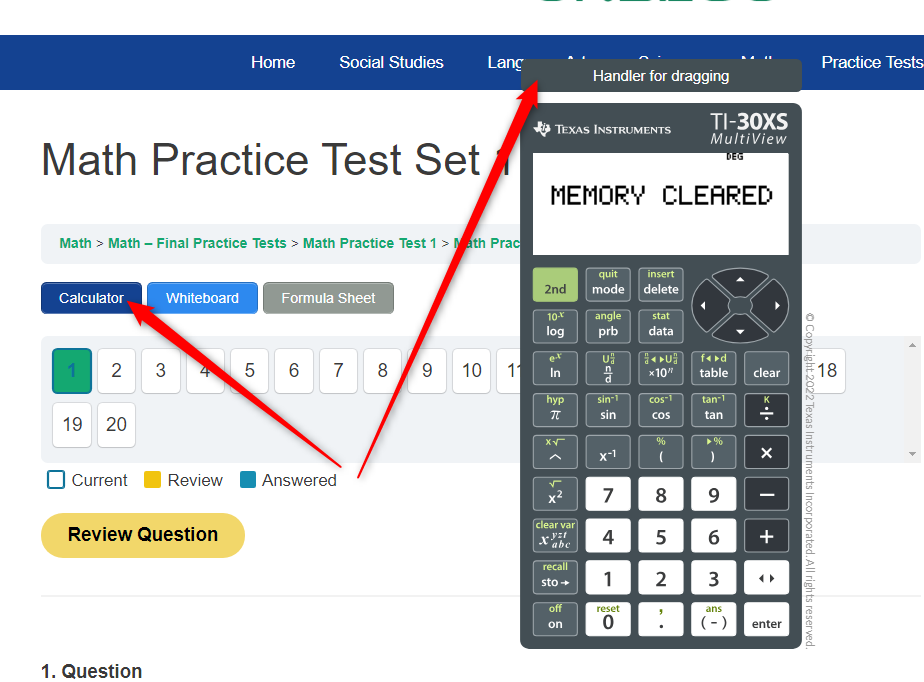
If you don’t see the calculator, please make sure that your browser allows pop-ups.
The creators of TI-30XS suggest getting a handheld device to use during Math lessons. You can find it on Amazon for just $15.
Feel free to reach out if you need help with this setting in your internet browser, and we’ll be happy to assist you in resolving this issue.
Just a friendly reminder: The TI-30XS calculator is included in all of our practice tests, but not in the lessons and mini-quizzes.
When preparing for your GED test with Onsego30, you’ll see the Onsego logo and webpages because Onsego30 is part of the Onsego GED Online Prep System.