
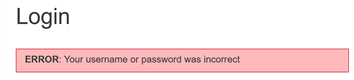
If you get an error message.” Your username or password was incorrect,” and you can’t reset it, you need to check for these errors:
1. Make sure there is no typo in the email you are trying to use. The email is only valid if it’s entered in an exact way. The solution to this problem is to type the email elsewhere, check it, and then paste it into the Onsego30 login form.
2. Check if you received a welcome email from Onsego30. If you didn’t get any email from us, it means that there is a typo in the email address that you used when you signed up.
Usually, when you sign up, you are automatically logged into your Onsego30 account, but if there is a typo in your email address, you can’t log in because your real email address is not in Onsego30’s database.
Contact us and let us know your full name, your correct email address, and the date you purchased the Onsego30 plan. We will correct the typo, and you can continue using your Onsego30 account.
3. Make sure your Onsego30 account is still active. If your plan expired more than one month ago, your account is NOT longer active. If you want to continue learning with Onsego30, you need to renew your plan.